NOTE: The senate and house have different procedures for conducting and reporting votes.
Vote information on bills is included in the house or senate journal. The votes of individual representatives and senators are available only if (1) a record vote is requested at the time the vote takes place; or (2) when a record vote has not been taken, but member registers within a specified time limit and requests to have his or her vote recorded in the journal.
IMPORTANT: Vote information prior to the 79th Legislature must be located in the journal.
You can access a bill's vote information in the History or Actions window.
From the TLO Home page, in the Additional Searches area, click the View Votes link. The Vote Information page displays.
In the Bill Number field, enter a bill number.
From the Legislature dropdown, select the legislative session.
Click Go. The Actions page for the bill displays.
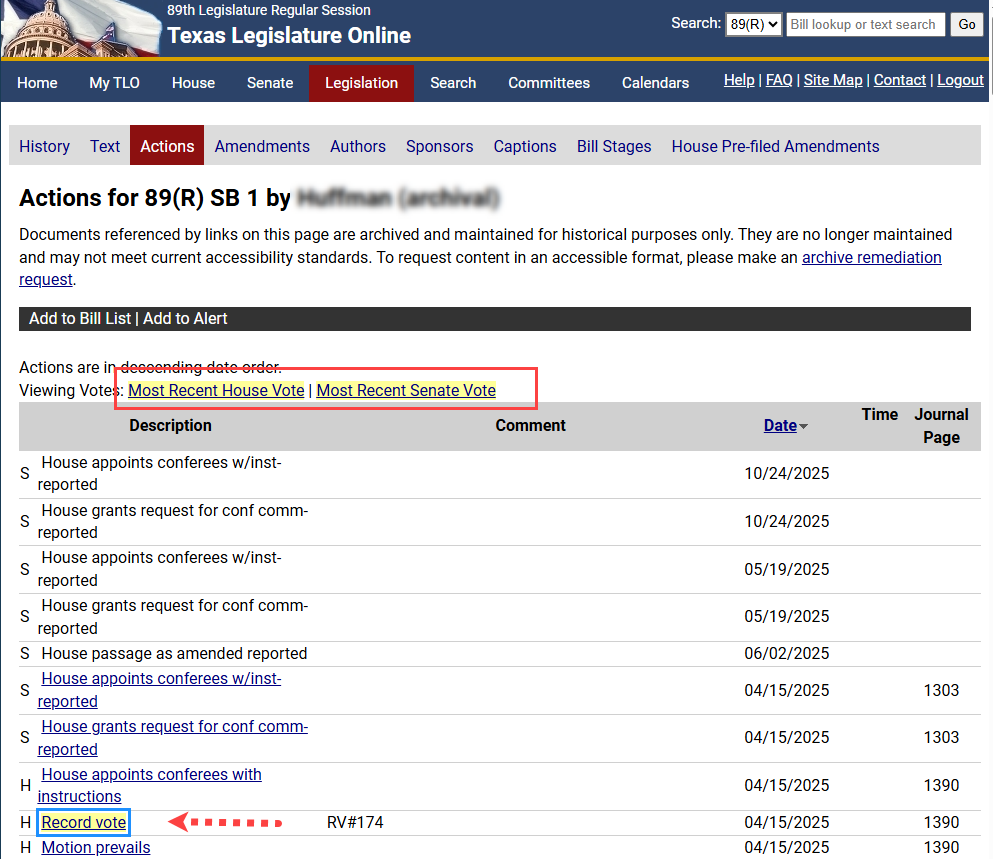
Click the Most Recent House Vote or the Most Recent Senate Vote link to navigate to the most recent house or senate Record vote action.
NOTE: (1) For the 79th Legislature, record vote information is available for final passage votes. If a record vote was not taken on final passage, the most recent vote links will not display. (2) If no record votes were taken on a bill in a legislature following the 79th Legislature, the most recent vote links will not display.
Click the highlighted Record Vote link in the Description column. The PDF of the journal containing vote information displays.
NOTE: Before the journal for that day is available, (1) an unofficial vote report will display if it is a record vote; or (2) a message that the journal is not available displays if it is not a record vote.
IMPORTANT: In the 79th Legislature, click the View House Vote link to view the final passage vote information.