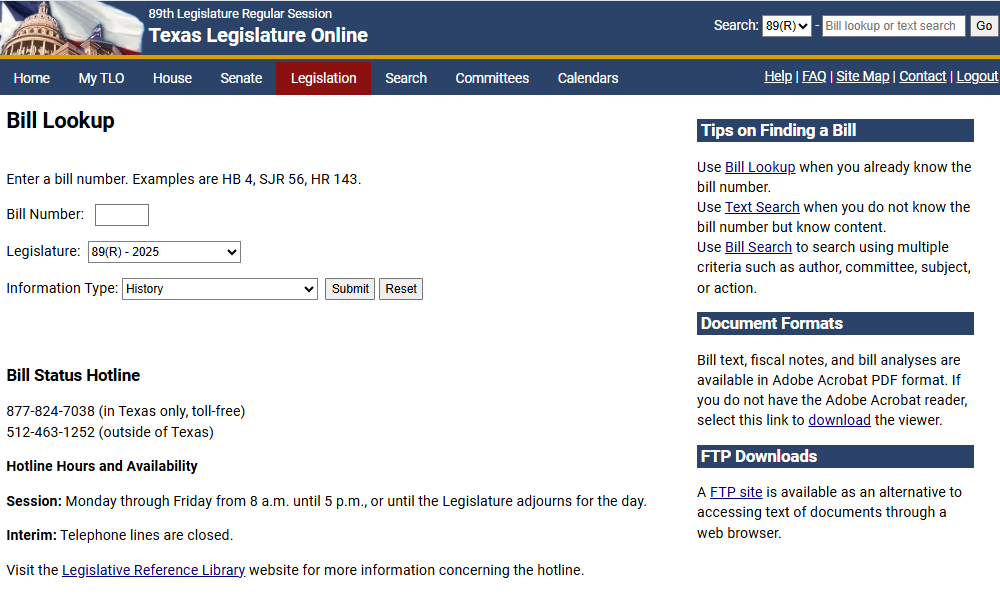
Use the Bill Lookup window to look up or compare bill numbers during a specific legislative session. You can choose the information you want to initially display for the bill.
Click the Legislation tab, then click Bill Lookup. The Bill Lookup window displays.
In the Bill Number field, enter the bill number you want to look up.
NOTE: This field is not case-sensitive. The bill number must be entered in the standard format of Chamber, Bill Type, and Number (e.g., SB6 or HJR10).
From the Legislature dropdown, select a legislative session.
From the Information Type dropdown, select the information you want to display when you look up a bill:
History: Displays the entire history of a bill.
Actions: Displays the Bill Actions window with a description of the steps that a bill undergoes as it moves through the legislative process.
Amendments: Displays a list of any amendments associated with the bill.
Authors: Displays a list of the bill's authors.
Bill Stages: Displays the bill's progress through the legislative process.
Captions: Displays a list of captions for each version of the bill.
Companions: Displays any companion bills.
Index to Sections Affected: Displays the code, article, and section of the Texas Statutes affected by the bill. This information is maintained by the Legislative Reference Library.
Sponsors: Displays a list of the bill sponsors.
Text: Displays the text window where you can choose to view the full text of a bill, fiscal note, bill analysis, witness list, and summary of committee actions. Any fiscal impact statements are also displayed.
Click Submit. Depending on which Information Type you selected, the corresponding window displays.
NOTE: Click Reset to clear your criteria.